Consumer security · Buyer's guide
Avast antivirus explained: what it does, what it does not do, and how to judge it
Advertising disclosure
This article contains partner links to a third-party seller. If you buy something after following one, zlatavor.online receives a commission from that seller. You pay the same price either way, and the commission plays no part in what this article says. Everything below can be checked against the sources listed at the end.
zlatavor.online is an independent publication. It is not affiliated with, endorsed by or sponsored by Avast, Gen Digital Inc. or any of their subsidiaries.
Avast is one of the best-known consumer security brands in Europe, and one of the most heavily marketed. This guide sets out what the product family actually covers, where the marketing runs ahead of the engineering, what independent laboratories measure, and the one episode in the company's history that any honest article about it has to mention. Where we cannot verify a claim, we say so rather than repeating it.
The short version
- Avast is no longer an independent company. It is a brand of Gen Digital Inc., the group formed when Avast merged with NortonLifeLock in 2022.
- Feature sets differ sharply between the free antivirus and the paid suites. Several features that advertising attributes to “Avast” belong only to the paid tiers.
- Every Windows 10 and Windows 11 machine already runs Microsoft Defender Antivirus by default. A paid product has to beat that baseline, not beat having nothing.
- In 2024 the US Federal Trade Commission ordered Avast to pay 16.5 million dollars over the sale of browsing data through its Jumpshot subsidiary. That is public record and it belongs in any buying decision.
- Prices, plan names and bundled features change often. Treat the seller's own page as the authority and this article as background.
1. What Avast is today
Avast began in Prague. It was founded in 1988 by Pavel Baudiš and Eduard Kučera, originally under the name Alwil, and grew into one of the largest consumer antivirus vendors in the world, largely on the strength of a genuinely capable free product. In 2016 it acquired AVG, its main Czech rival.
The important structural change came later. Avast merged with NortonLifeLock in a deal that completed in 2022, and the combined group was renamed Gen Digital Inc. Gen Digital now owns Norton, Avast, AVG, Avira, CCleaner and LifeLock among other brands. This matters for two practical reasons. First, several of the products marketed as competitors to one another now sit under the same corporate roof and share engineering. Second, when you read that “Avast is a leading cybersecurity company”, the accurate statement today is that Avast is a leading consumer security brand within a larger listed group.
Naming, briefly
Avast Free Antivirus is the no-cost product. Avast One is the name used for the combined consumer suite, which is sold in several tiers, including a limited free tier. Older names such as Avast Premium Security still appear in search results and in resellers' catalogues. Because the line-up is reorganised periodically, check the plan table on the seller's page before you buy rather than relying on any third-party summary, including this one.
2. How threats actually arrive
Most home infections are not the result of an exotic exploit. They follow a small number of well-worn routes, and in almost all of them a person clicks something first. Understanding the routes tells you which product features are load-bearing and which are decoration.
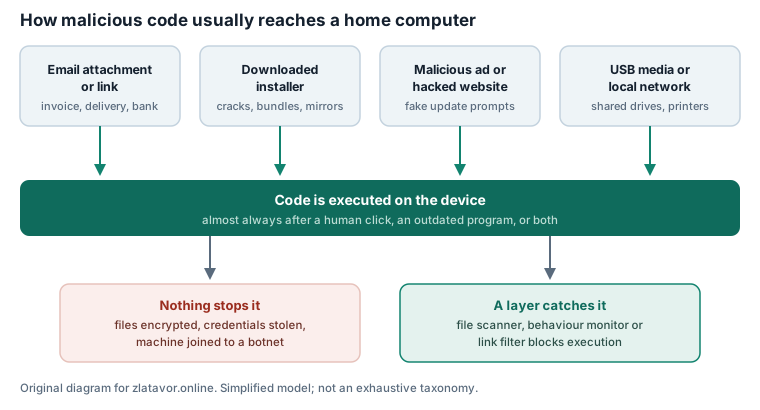
Two observations follow from that picture. The first is that the browser and the mail client are where most of the risk enters, which is why link filtering and download scanning matter more in practice than the size of a signature database. The second is that a large share of successful attacks exploit software that is simply out of date. Keeping Windows, your browser and your PDF reader patched removes more risk, for free, than any paid feature does.
3. How detection works
“Antivirus” is a single word for four fairly different techniques. Vendors combine them, and the marketing term for the combination varies — “multi-layered”, “AI-powered”, “next-generation” — but the underlying methods are standard across the industry.
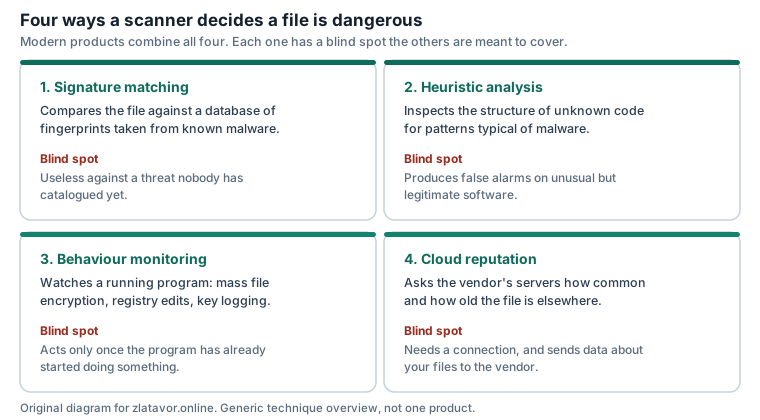
The phrase you will see most often in advertising is that machine learning lets a product “predict and stop threats before they appear”. The defensible version of that claim is narrower: statistical models generalise from known malicious code well enough to flag some previously unseen samples that share its characteristics. That is a real and useful capability. It is not prediction, it is not unique to any one vendor, and it does not make a product immune to genuinely novel attacks. We have written it the narrow way throughout this article.
4. Why layers matter more than brands
Security people talk about defence in depth because no single control holds. The useful question when buying is not “is this product good?” but “which of my layers is currently empty?”
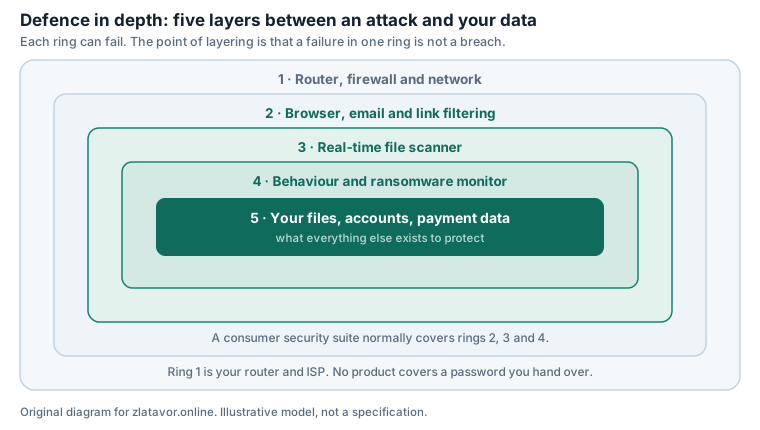
A security suite typically strengthens the middle of that diagram. It does nothing about a router still running its factory password, and nothing about credentials you type into a convincing fake login page yourself. If those two layers are weak, they are the cheaper thing to fix first.
5. Free version versus paid plans
This is where most advertising for security products, including advertising that has appeared on pages like this one, becomes misleading. Features get attributed to “Avast” without saying which plan includes them. The honest summary is by category rather than by plan name, because plan names change:
| Capability | Typically in the free product | Typically paid |
|---|---|---|
| Real-time malware scanning | Yes | Yes |
| Malicious website and download blocking | Yes | Yes |
| Ransomware / protected-folder controls | Limited or absent | Yes |
| Firewall beyond the Windows one | No | Yes |
| VPN with meaningful data allowance | No — free tiers are capped | Yes |
| Identity or data-breach monitoring | No | Yes, where offered in your country |
| Cover for several devices and platforms | Usually one device | Yes, count varies by plan |
Two corrections to claims that circulate widely. A meaningful VPN allowance is a paid feature; free tiers of bundled VPNs are capped at a daily or monthly data limit that is not enough for ordinary browsing. And an integrated suite is not automatically better than separate tools — it is more convenient, it is one bill, and it is one vendor holding more of your data. Convenience is a real benefit. It is not the same benefit as protection.
Check the current plan table before you decide
Plan contents, device counts and prices are set by the seller and change without notice. Nothing on this page should be treated as a quotation. The only authoritative version of what a plan includes today is the seller's own page, and in case of any divergence between this article and the seller's information, the seller's information prevails.
6. The VPN question
VPNs are the single most oversold component of consumer security bundles, so it is worth being precise about what one is for.
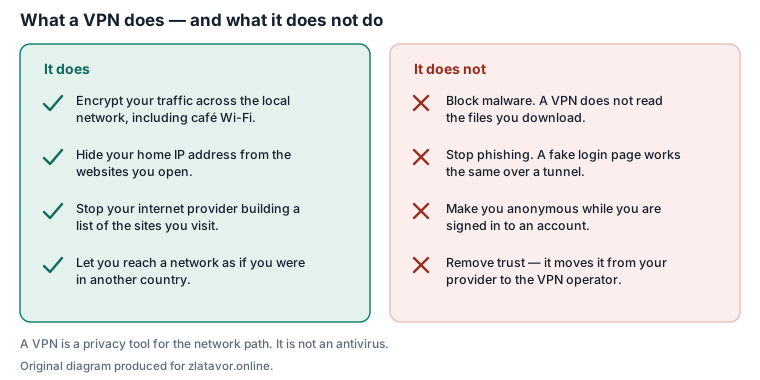
A VPN encrypts the path between your device and the VPN operator's server. That is genuinely useful on a network you do not control, and it stops your internet provider compiling a list of the sites you open. It does not inspect downloads, it does not recognise a fake login page, and it does not make you anonymous to a service you are signed in to. It also does not eliminate trust: it relocates it from your internet provider to the VPN operator, which is a reasonable trade only if you have a view about that operator.
Modern browsing is already encrypted at the site level by HTTPS, which is why the older argument that public Wi-Fi exposes your passwords is much weaker than it was a decade ago. The remaining benefits are real but narrower than the advertising suggests.
7. Phishing: the unsolved part
Every vendor blocks known phishing URLs, and every vendor misses new ones, because a fresh domain has no reputation to look up. The defence that actually scales is recognising the shape of the message.
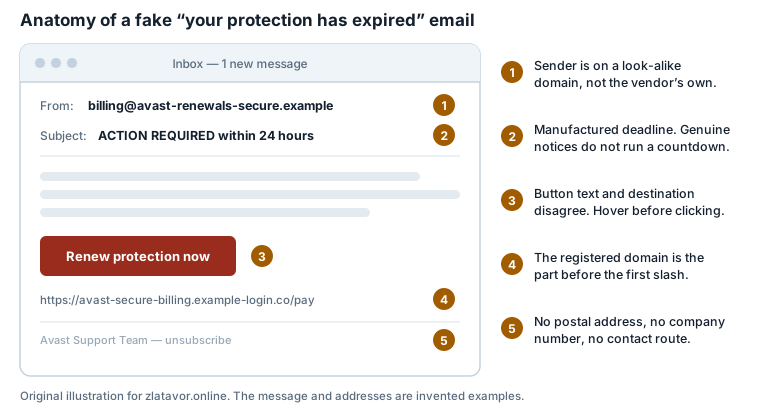
Note the third marker in particular. Security vendors themselves are among the most commonly impersonated brands in renewal scams, precisely because “your protection has expired” is a plausible thing to receive. If you buy any security product, expect look-alike renewal emails afterwards, and make it a rule never to renew by clicking a link in one. Open the vendor's site yourself, or open the application on your machine.
8. Microsoft Defender as the baseline
Microsoft Defender Antivirus is built into Windows 10 and Windows 11 and is switched on by default unless another product replaces it. It costs nothing, it is patched through Windows Update, and in independent laboratory testing it has for several years scored in the same general band as the commercial products on core malware protection.
This changes the question a paid product has to answer. It is not “is this better than nothing”. It is “what do I get beyond Defender?” Defensible answers exist: cover for macOS, Android and iOS devices under one subscription; a bundled VPN you would otherwise buy separately; identity and breach monitoring; ransomware controls that are easier to configure; and a support channel to contact when something goes wrong. Whether those are worth the subscription is a personal judgement about your device count and your patience, not a technical verdict we can make for you.
9. How to judge any suite
Three laboratories publish methodologies and results that a non-specialist can read: AV-TEST in Magdeburg, Germany; AV-Comparatives in Innsbruck, Austria; and SE Labs in the United Kingdom. They test on live threats under documented conditions and publish the conditions alongside the results.
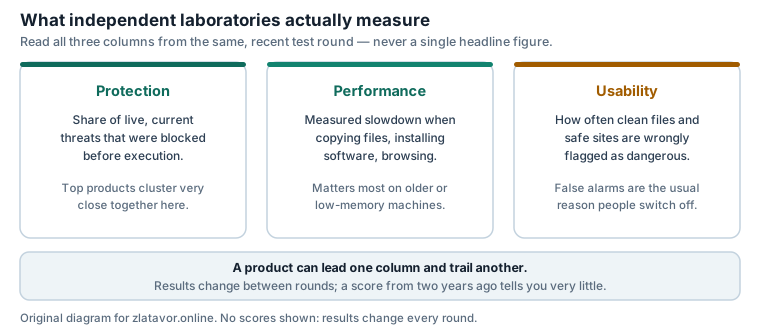
We deliberately quote no scores in this article. Published results change with every test round, a figure copied from an old report is worse than no figure at all, and a number without its test date and methodology is exactly the kind of claim this site refuses to make. Open the current report for the product and the month you care about; the links are in the sources below.
Three further practical checks that no laboratory covers: how the subscription renews and at what price, how many devices and which operating systems a plan actually covers, and how you cancel. Those determine most of the dissatisfaction people report with security subscriptions.
10. The privacy record
What happened
Avast operated a subsidiary called Jumpshot, which sold analytics derived from the browsing activity of users of Avast's free products. Following investigative reporting by PCMag and Motherboard, Avast announced in January 2020 that it was winding Jumpshot down.
In February 2024 the United States Federal Trade Commission announced a settlement under which Avast agreed to pay 16.5 million dollars and was prohibited from selling or licensing browsing data from its products for advertising purposes. The FTC's complaint stated that Avast had collected consumers' browsing information through its browser extensions and antivirus software and sold it without adequate notice or consent, while advertising that its products would block online tracking.
We include this for three reasons. It is documented in a public regulatory order rather than alleged. It goes to exactly the quality — trustworthiness with your data — that a security product is sold on. And an article that promoted the brand while omitting it would be misleading by selection, which is the standard this site holds itself to in its editorial policy.
The fair counterweight: the settlement concerns conduct that ended in 2020, the company was subsequently acquired, and regulatory orders of this kind impose ongoing compliance obligations. Reasonable buyers reach different conclusions from the same facts. Our position is that you should have the facts.
11. Buying and cancelling in the EU
If you buy as a consumer in the European Union, some rights apply whatever the seller's own terms say:
- Pre-contract information. The seller must give you the total price including taxes, the duration of the contract, and the conditions for terminating it, before you are bound.
- The 14-day withdrawal right exists for distance contracts, but for digital content supplied immediately it can be lost: if you give express consent to begin the download and acknowledge that you thereby lose the right of withdrawal, the seller may refuse a refund. Read that checkbox rather than clicking past it.
- Automatic renewal. Most security subscriptions renew automatically, often at a higher price than the introductory one. The renewal terms must be disclosed to you. Note the renewal date somewhere you will see it.
- The seller is your counterparty, not this website. Any contract, payment, licence, support obligation and refund is between you and the seller. zlatavor.online is not a party to it and cannot process a refund, cancel a subscription or provide product support.
This is general information about consumer rules, not legal advice on your situation.
12. Who it suits
A reasonable fit if you have several devices across Windows, macOS and Android and want one subscription covering them; if you want a VPN and an antivirus on one bill; if you prefer a single interface with plain-language status rather than assembling separate tools; or if you want a named support channel.
Probably unnecessary if you run a single, up-to-date Windows machine, apply updates promptly, use a password manager with two-factor authentication, and are comfortable with Microsoft Defender. That combination is already a decent posture, and the honest advice is that you would gain more from a good backup routine than from a second scanner.
If you have decided to buy
Buy from the vendor's own site or an authorised seller. Download links circulated in email, in search advertisements or on software-mirror sites are a standard malware route — see the diagram in section 2. Check the plan table, the device count and the renewal price on the page before you pay.
13. Sources
- US Federal Trade Commission, press release and consent order concerning Avast Limited, February 2024 — ftc.gov, search “Avast”. Basis for the settlement amount and the prohibition described in section 10.
- Avast statement on the closure of Jumpshot, January 2020; and the investigative reporting by PCMag and Motherboard that preceded it.
- Gen Digital Inc. corporate and investor information, for the ownership structure and brand list in section 1.
- AV-TEST Institute, Magdeburg — av-test.org, for the protection / performance / usability testing model in section 9.
- AV-Comparatives, Innsbruck — av-comparatives.org, Real-World Protection, Malware Protection and Performance test methodologies.
- SE Labs, United Kingdom — selabs.uk, home anti-malware protection reports.
- Microsoft documentation on Microsoft Defender Antivirus in Windows 10 and Windows 11.
- Directive 2011/83/EU of the European Parliament and of the Council on consumer rights, for the withdrawal-right summary in section 11.
- Avast and Gen Digital product pages, for plan structure — the authoritative and frequently changing source.
Accuracy, corrections and independence
Written by James Gray for CLEAN KLASS s.r.o., published 22 September 2026 and reviewed on the same date. Plan contents, prices and feature names are set by the vendor and change without notice; where this article and the vendor's own current information diverge, the vendor's information prevails. No scores, prices, user counts or test results are quoted here that we could not attribute to a named source.
The illustrations and diagrams on this page are original SVG files drawn for this article by the editorial team. They contain no vendor screenshots, logos or stock photography. They are explanatory models, not product specifications.
If you believe something here is wrong, write to info@zlatavor.online and we will check it. Corrections are made on the page and noted in the revision line. Our procedure is set out in the editorial policy.
Trademark notice
Avast is a trademark of Gen Digital Inc. or its affiliates. Microsoft, Windows and Microsoft Defender are trademarks of Microsoft Corporation. AV-TEST, AV-Comparatives and SE Labs are the marks of their respective organisations. zlatavor.online is an independent publication and is not affiliated with, endorsed by or sponsored by any of them. All marks are used for identification and descriptive purposes only.